Substack shows which Notes and posts brought subscribers. Studio connects everything else: each person across Substack, Gumroad, Kit and Skool with their whole history, whether the subscribers each source brings actually read or pay, and which links bring sales. It copies what you use (Medium and systeme.io too) into one database on your own computer, so you know who to talk to and what to write next. Ask Claude about any of it in plain English, and nothing goes out until you say yes.
41 subscribers have bought from you on Gumroad, and 12 of them twice or more. Most found you through recommendations, and they open your step-by-step guides far more than your opinion pieces.
Nine of them haven't heard from you in three months. Want me to draft a short check-in for each? I'll show you every one before anything is sent.
An illustration with made-up numbers.
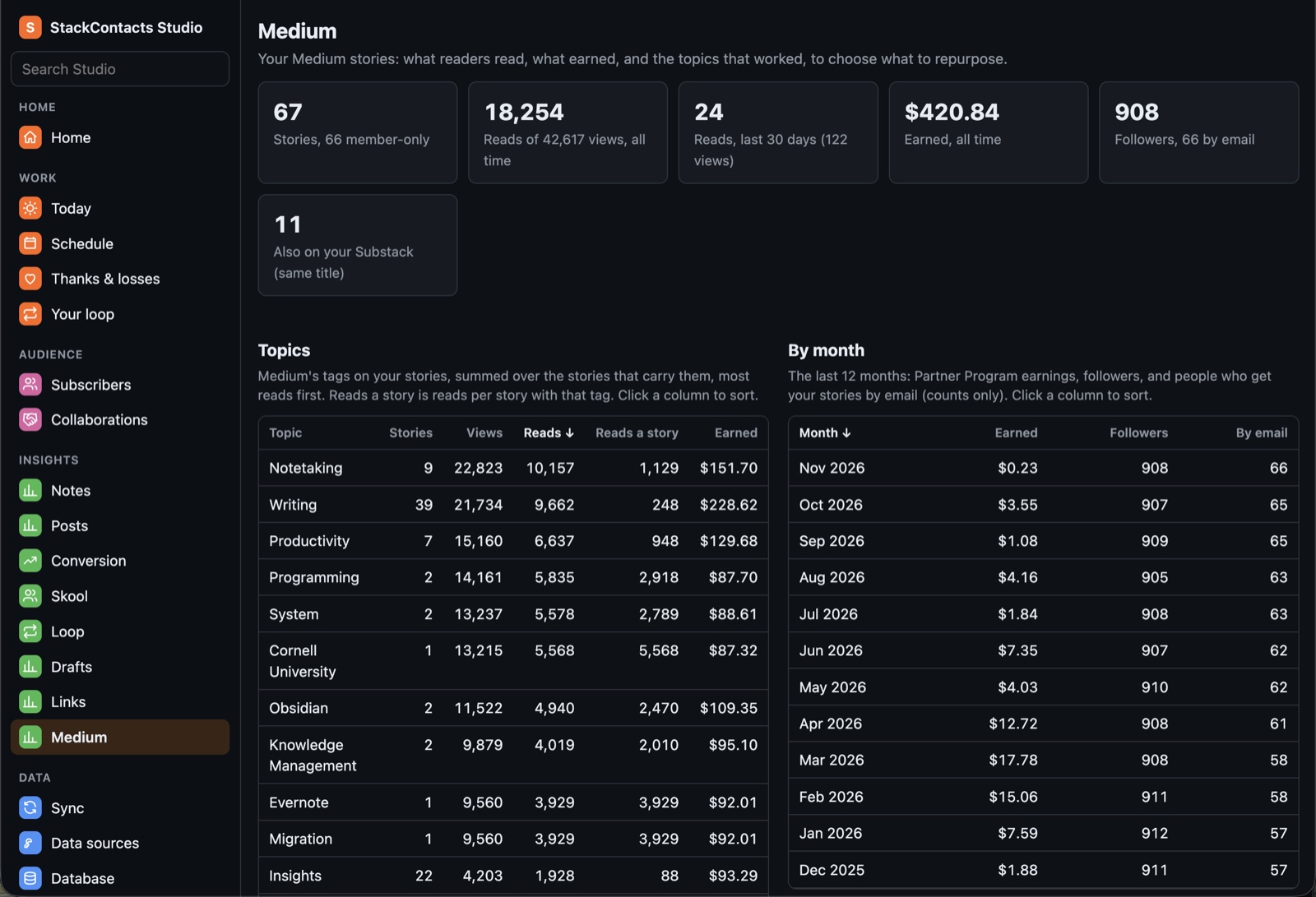
If you've written on Medium for years, that archive is worth more than a link in your bio. Allow Medium on Studio's Data sources page, and Studio brings in every story you wrote, its stats and earnings day by day, and the passages your readers highlighted, with how many marked each one.
On Insights → Medium, pick a story and who it's for (readers of your posts on that topic, your most engaged readers, your buyers). Claude proposes new angles, writes the one you pick, and saves it as a Substack draft for you to finish. Or turn it into Notes. The highlights show you which lines landed.
Read only: Studio never changes anything on Medium. New to Substack but have a Medium archive? That archive is your data, so Studio is a good fit already.
Studio's Chrome extension reads Substack and the platforms you connect through your own logins and keys, and copies them into one database on your computer, now or every day. You choose which publications and parts it keeps.
Studio's pages show who's waiting on you, who to thank, who you lost, who's drifting, and which Notes turn into subscribers, with the reason next to each person.
Mark what needs a reply and ask Claude to work through it. It drafts each one, shows you the preview, and sends only after your yes.
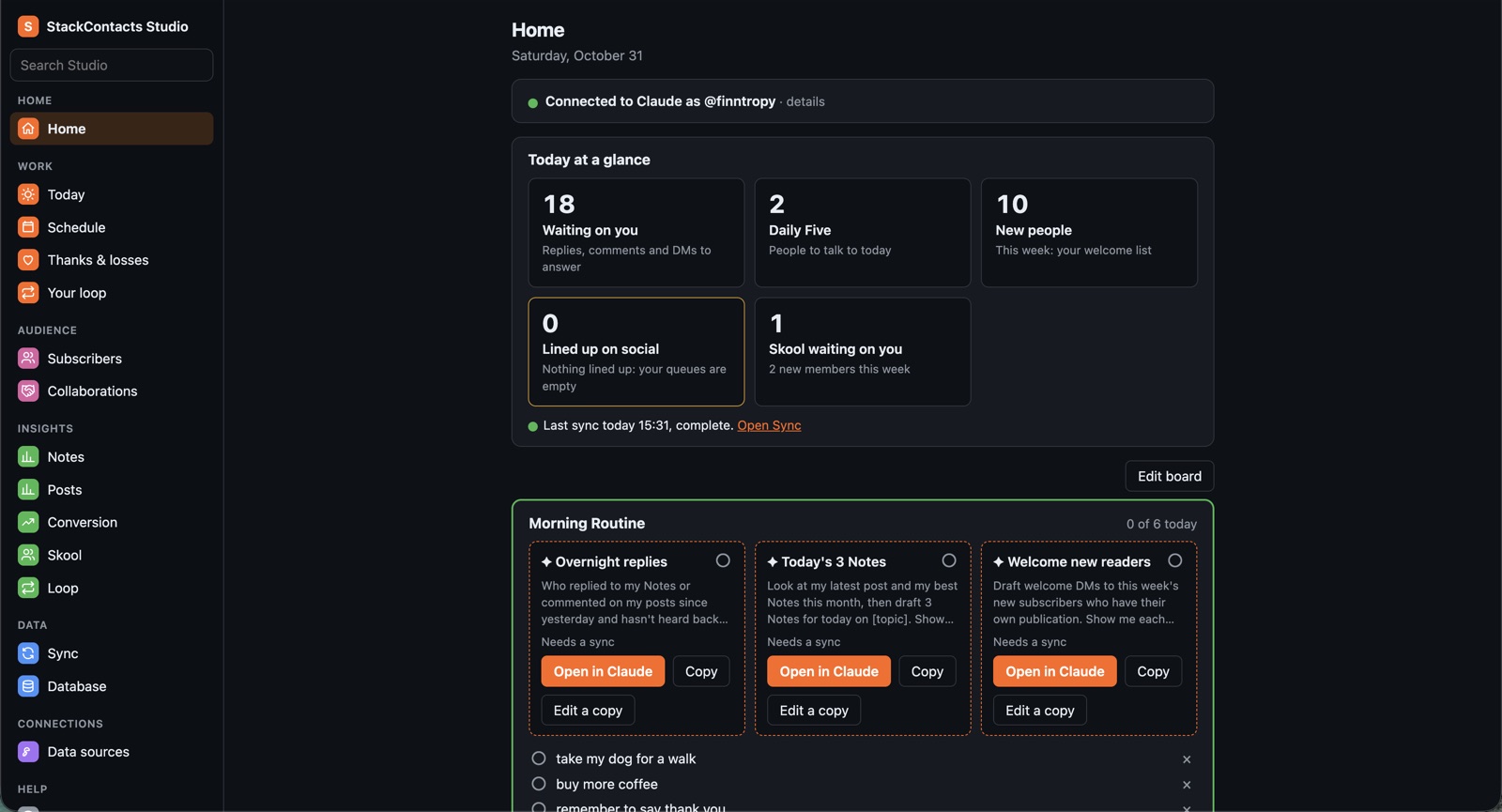
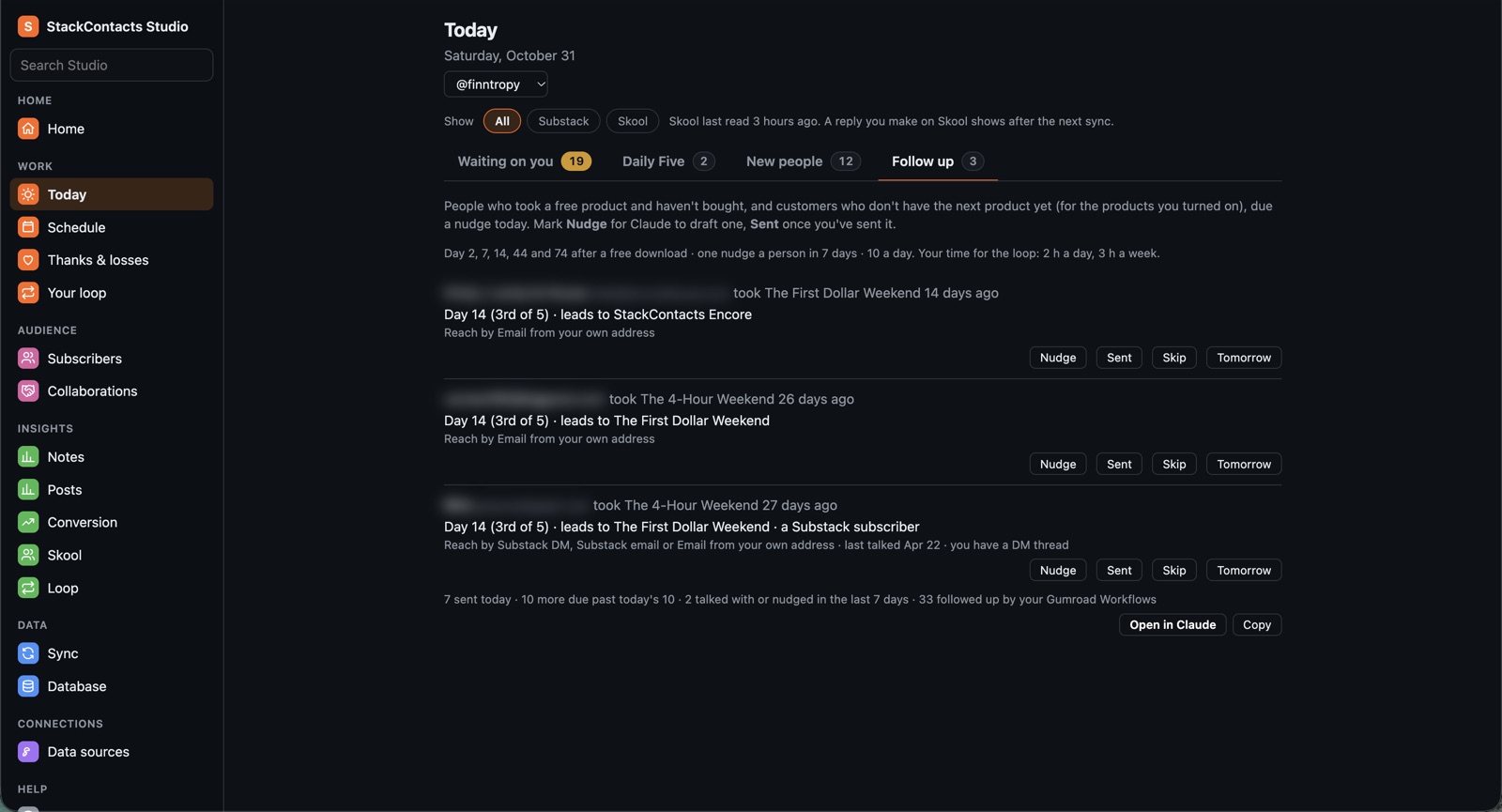
Replies, comments and DMs waiting on you, on Substack and Skool, oldest, newest or most valuable first. Five people to talk to today, and why. Everyone new this week: who subscribed, joined your Skool community, or joined your Kit or systeme.io list. Someone who joined in two places is shown once.

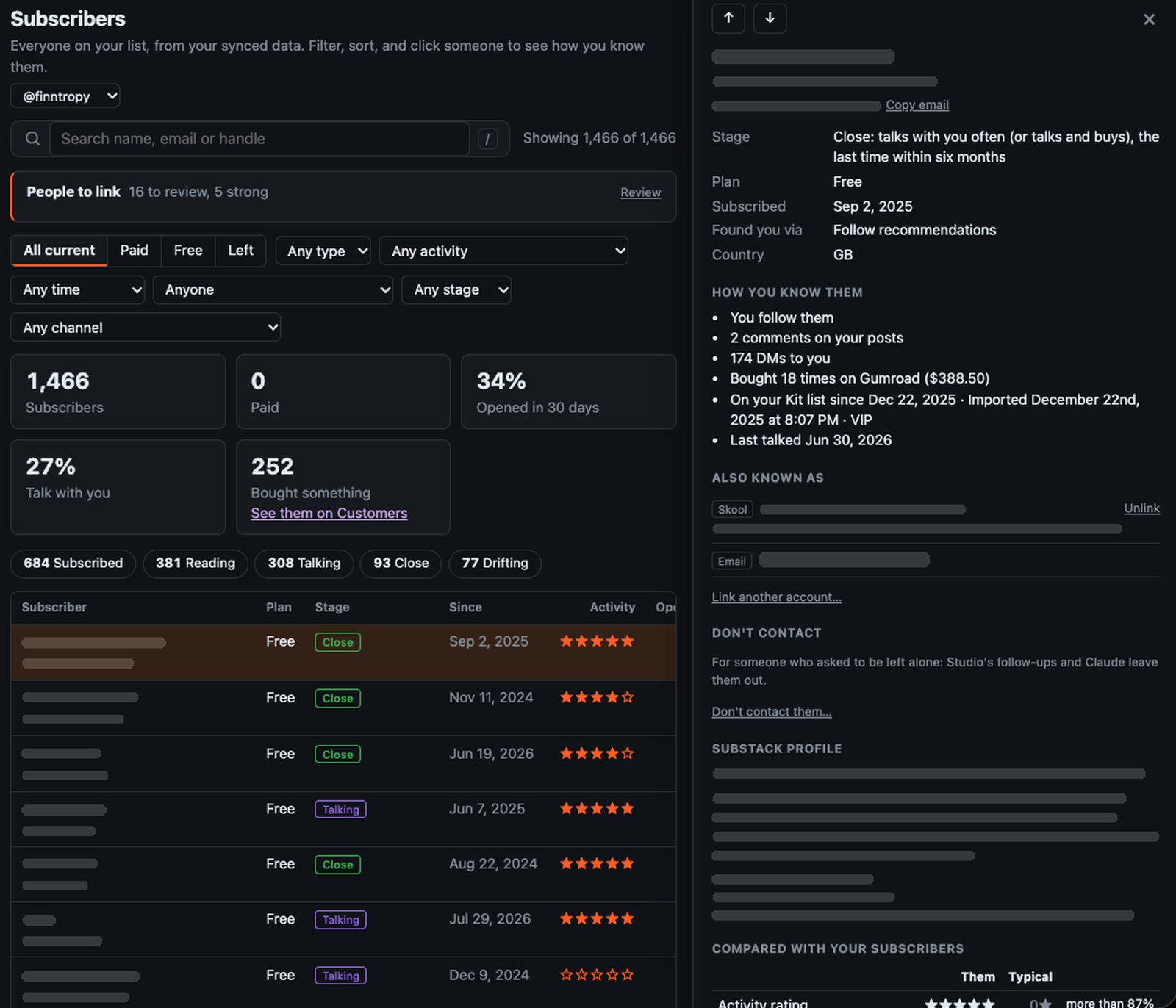
Everyone on your list, with their stage: Reading, Talking, Close or Drifting. Click someone and their whole relationship with you is there at once:
Thanks & losses shows who recommended you, restacked you, bought or went paid and hasn't heard from you since, and who left, starting with people you knew.
My own Subscribers page. Names, emails and profiles are hidden.

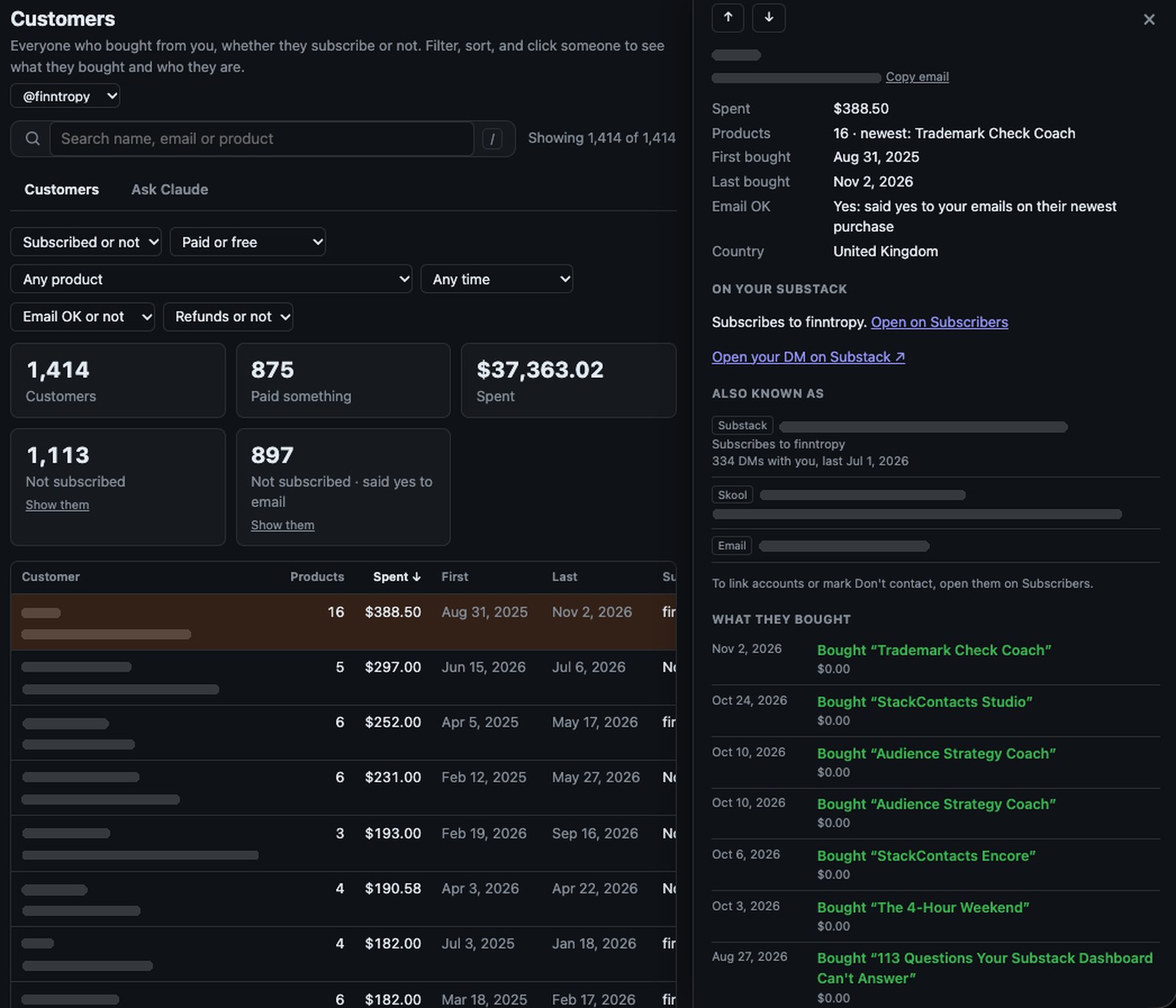
Every Gumroad buyer, including the many who never subscribed to your Substack. Filter by product, paid or free, date, refunds, and whether they said yes to your emails, and see at a glance who you could invite to your publication.
Click a customer for everything they bought and when, what they've spent, whether they subscribe, and their other accounts, with a link straight to your DMs. It's the history a good CRM keeps, built from data you already have and kept on your own computer.
My own Customers page. Names and emails are hidden.

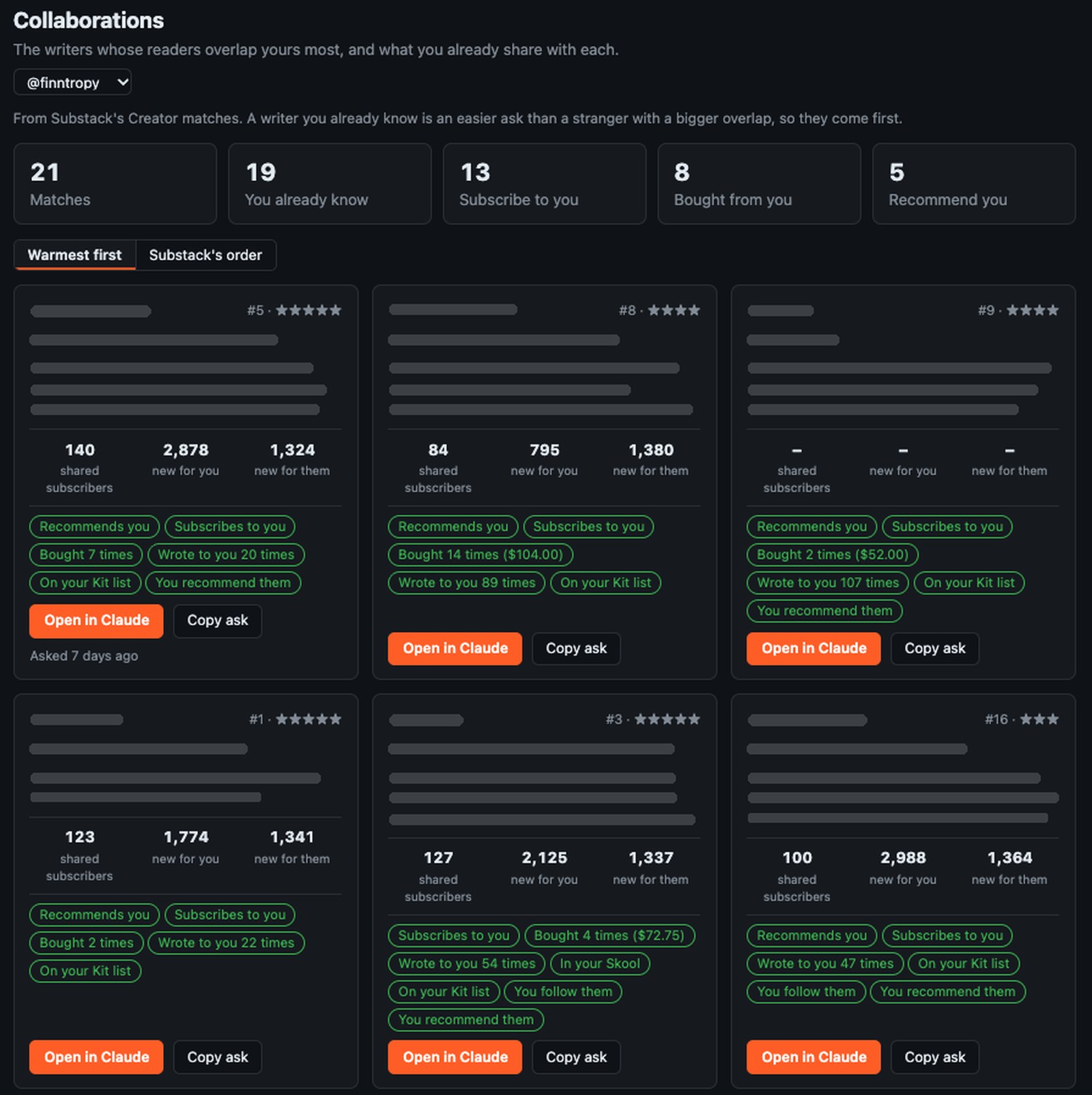
Substack's Creator matches show the writers whose readers overlap yours most. Studio adds what you already share with each one: whether they subscribe to you or recommend you, have bought from you, are on your Kit list or in your Skool, how often you've written to each other, and whether you follow or recommend them.
Warmest first puts the writers you already know ahead of strangers with a bigger overlap. Someone who reads you and buys from you is an easier ask. Open in Claude starts the conversation: Claude reads what you share with that writer and drafts the pitch for you to edit.
My own Collaborations page. Writers' names, publications and bios are hidden.

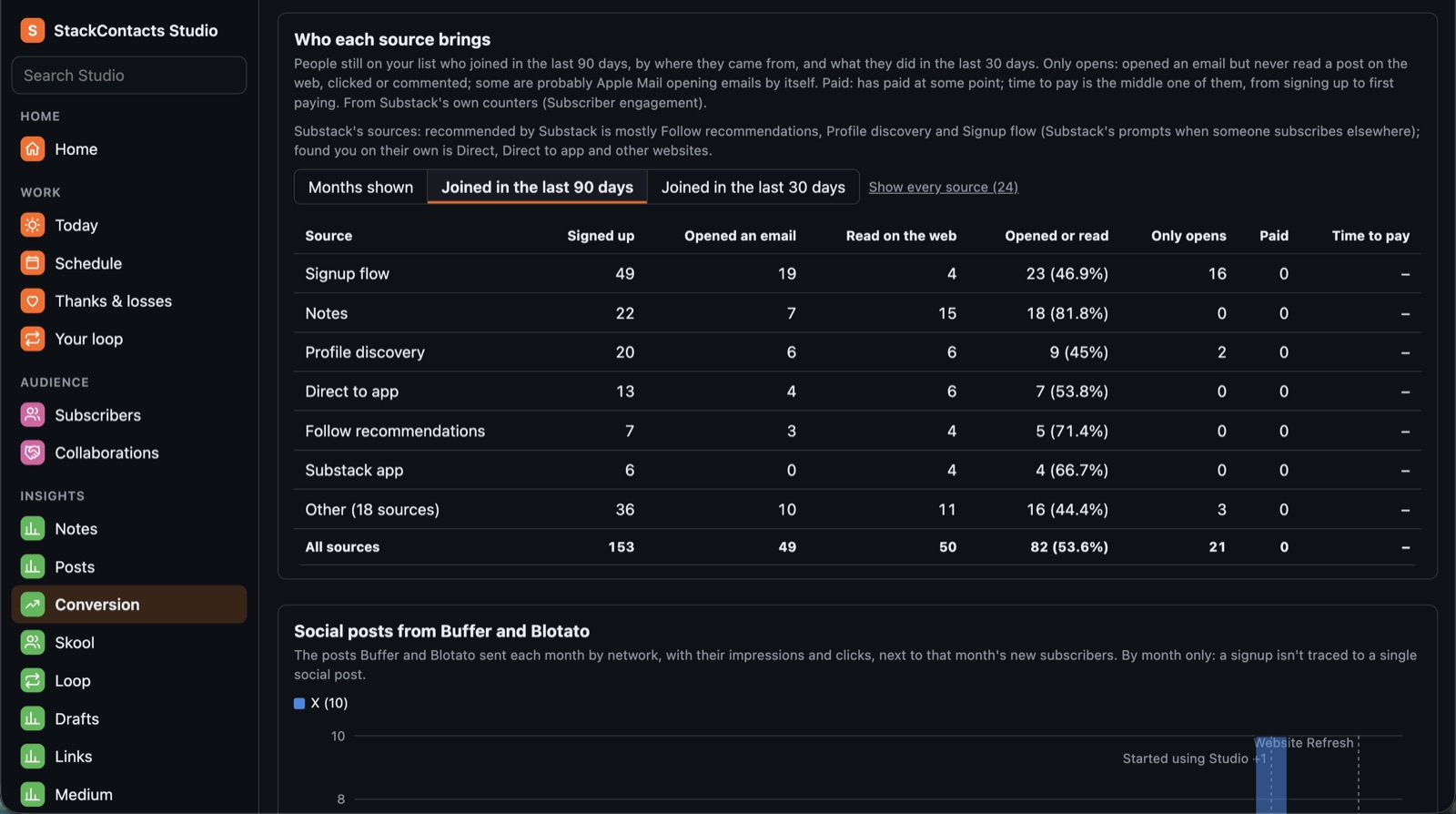
The Notes and posts that bring in subscribers, signups by source as Substack counts them, and who each source brings: whether those subscribers read, only open, or pay, and how long they take to pay. Then Notes by tag, your Medium stories and what readers highlighted, which links and posts bring in sales, and your Skool community over time.

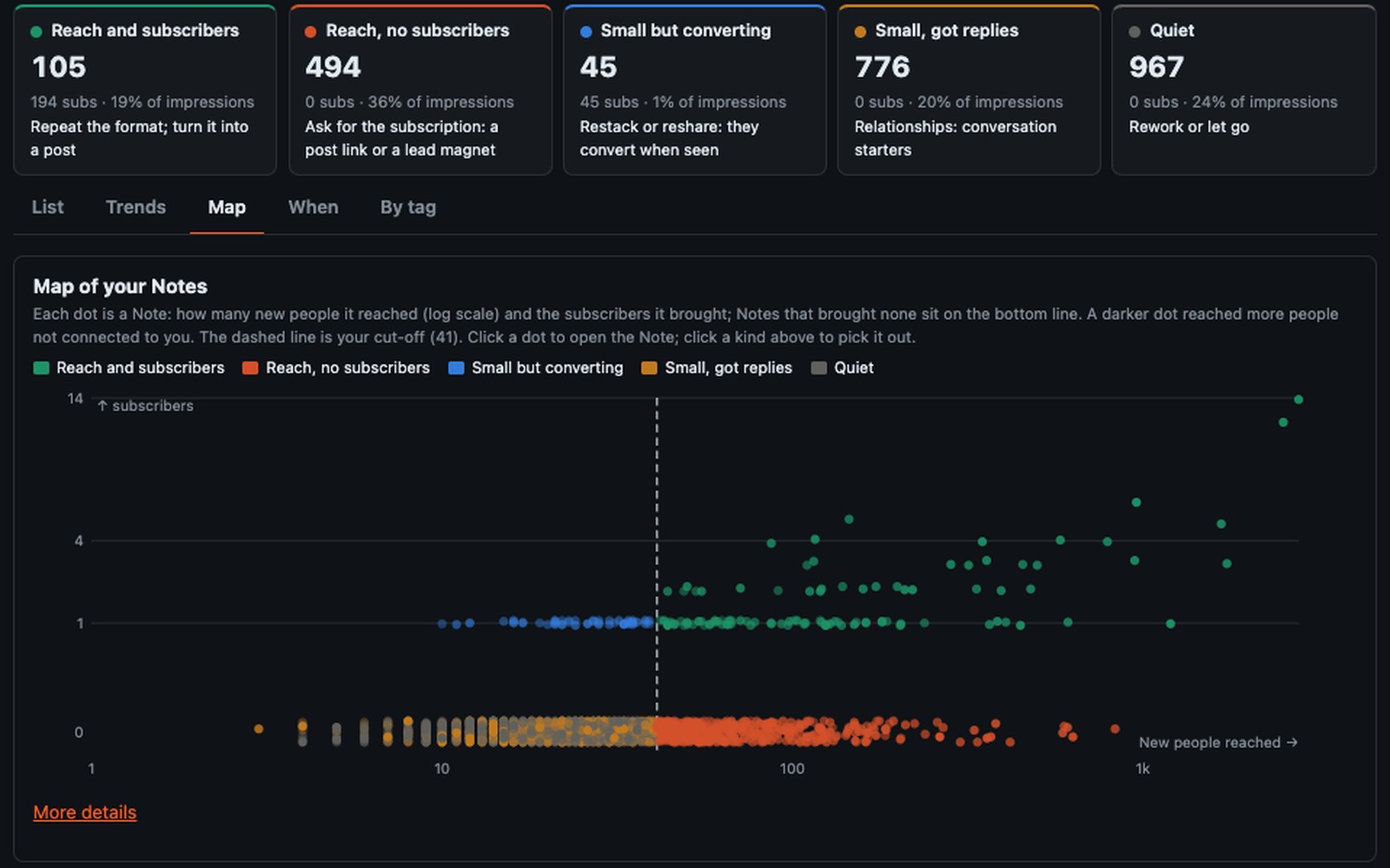
Studio puts every Note into one of five kinds, using cut-offs from your own Notes, and tells you what to do with each:
The Map shows every Note as a dot: how many new people it reached (followers and people not yet connected to you, never your own subscribers) against the subscribers it brought. Click a dot to open the Note. The When tab shows whether the day and time you post make a difference, and says so plainly when they don't.
My own Notes, all 2,404 of them. Your map will look different.

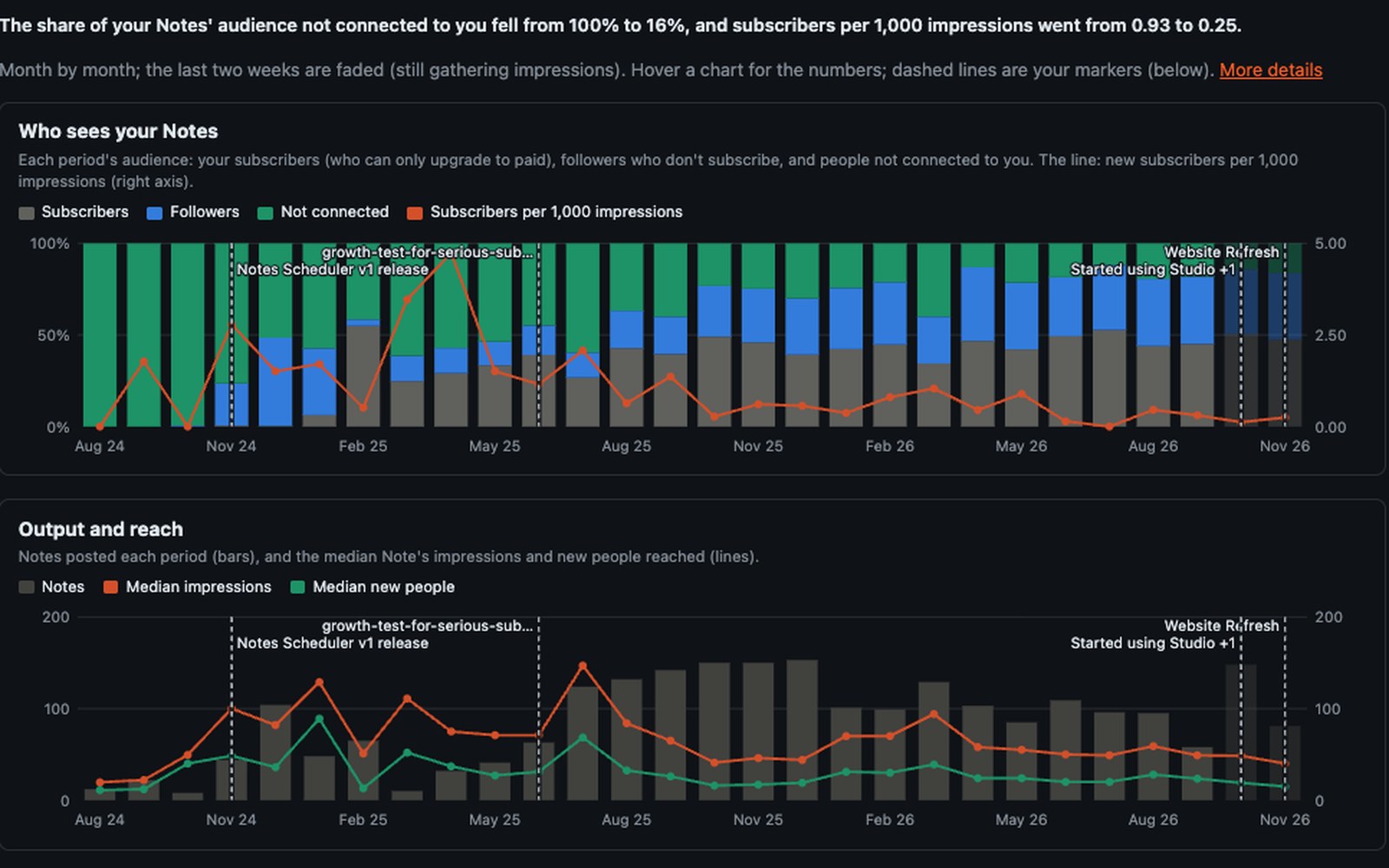
Trends shows your Notes month by month. It shows who saw them (your subscribers, your followers, or people not connected to you), how many you posted and how far they reached, and how much people engaged. It sums up what changed in one sentence at the top.
Then it shows what to do about it. Kinds of Notes over time uses today's cut-offs for every month, so you can see whether your Notes that reach and convert are getting rarer. Signups a month shows how many new subscribers came from Notes and profile discovery, out of all of them. Tags over time compares your topics quarter by quarter.
Add a marker when you change something, like "started ending Notes with a post link" or "new welcome email". It shows as a line on every Notes, Posts and Conversion chart, so you can see whether the change helped. Changes to your Substack profile are marked for you.
My own Notes since August 2024: over time they reached fewer people outside my followers. That kind of slowdown is hard to spot one Note at a time.

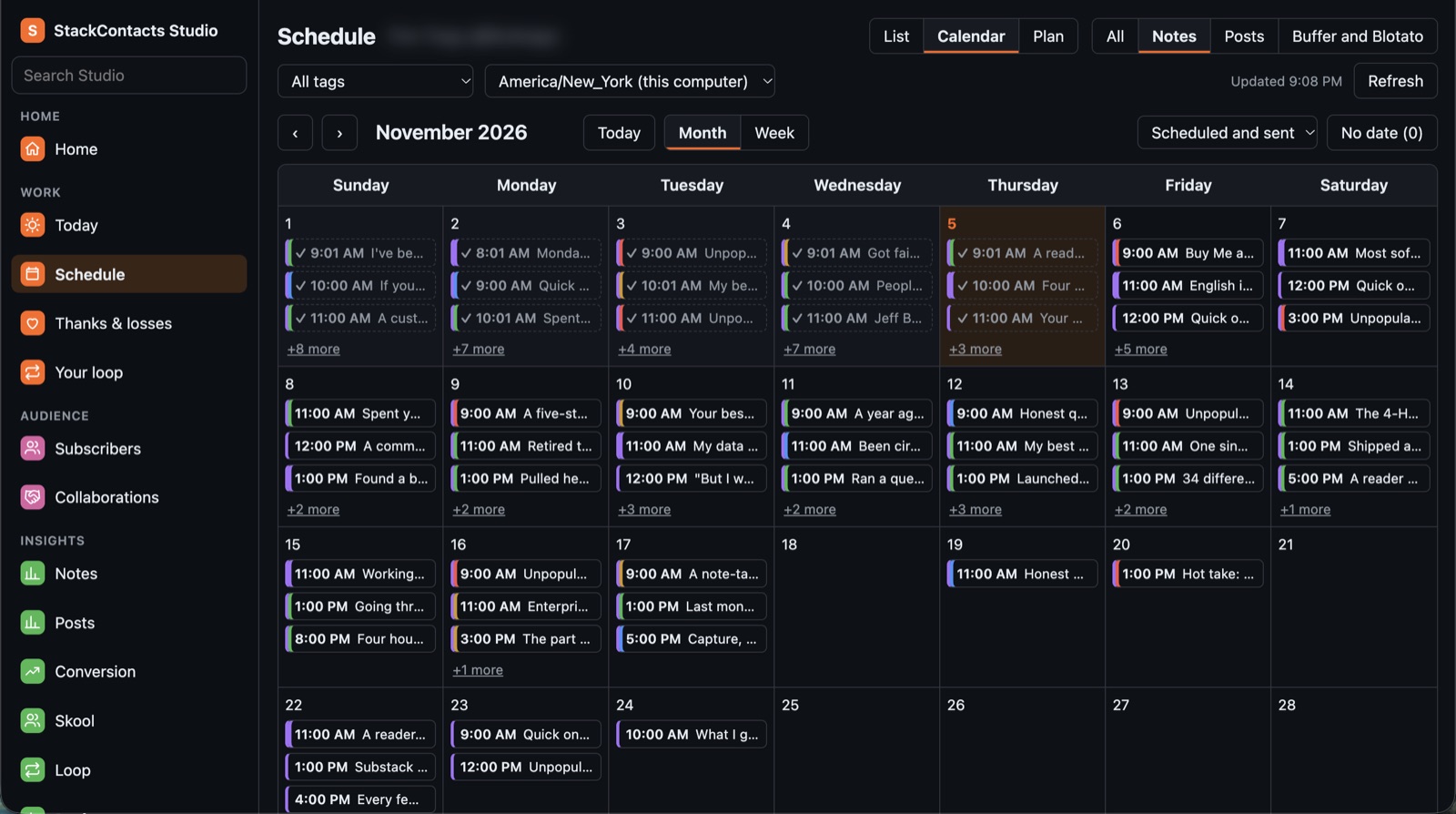
Your scheduled Notes and posts as a list or a calendar. Drag a Note to another day or hour, with 5 seconds to undo. Tell Claude how you post (a slot at 9:00, three Opinions a week): it tags your Notes, shows what's empty up to 92 days ahead, and fills gaps from your drafts.

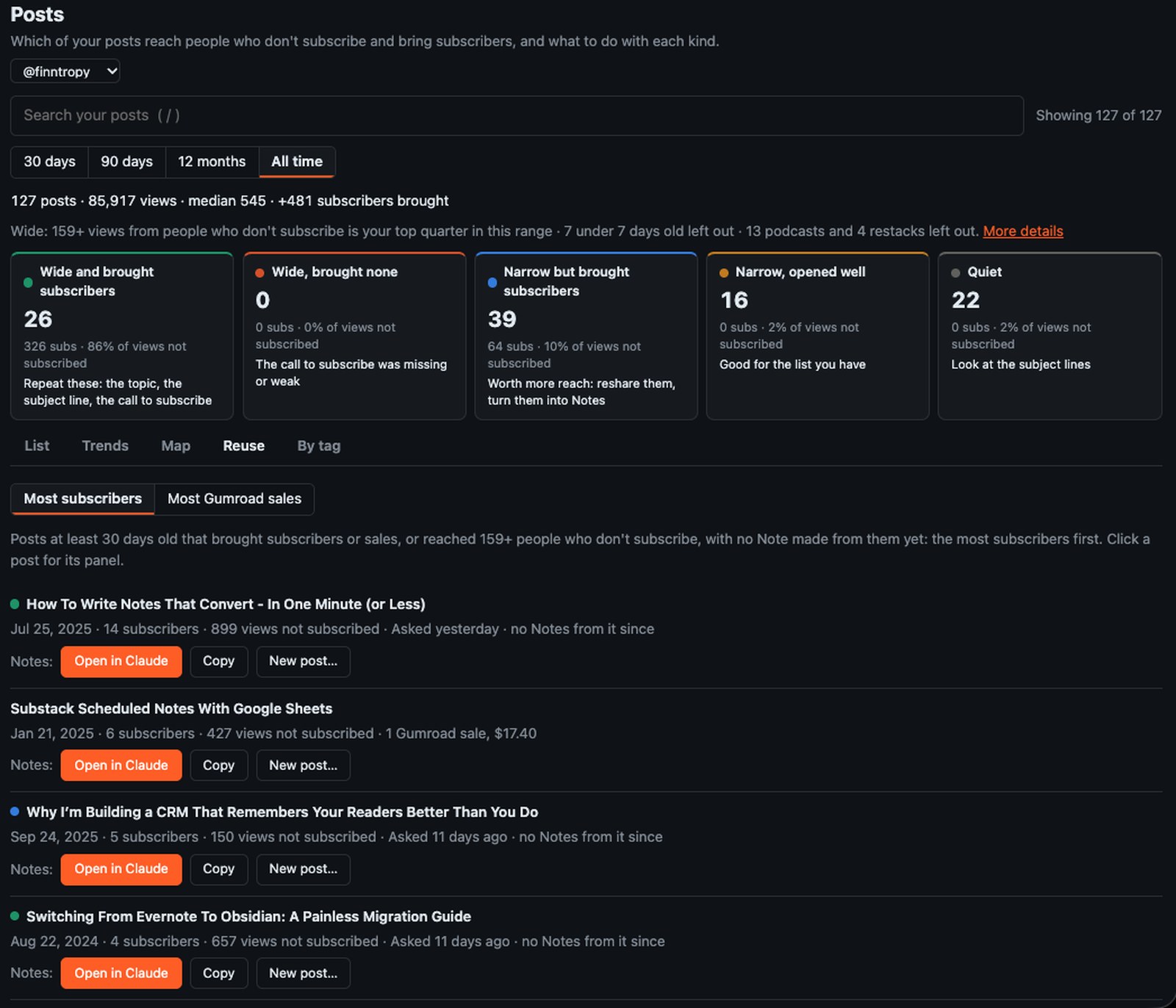
Posts sorts your newsletters into five kinds, like your Notes: which reached people who don't subscribe, which brought subscribers, and what to do with each.
Reuse lists your posts at least 30 days old that brought subscribers or Gumroad sales, or reached many people who don't subscribe, and that you haven't turned into Notes yet. The ones that brought the most subscribers or sales come first. Open in Claude writes Notes from one, or a new post.
Trends shows your posts quarter by quarter: signups per 1,000 views and open rate, output and reach, the Gumroad sales that probably came from each quarter's post links, and your posts next to your Notes. When both slow down together, it's your audience that changed, not one format.
From Medium, pick a story and who it's for (readers of your posts on that topic, your most engaged readers, your buyers): Claude proposes new angles, writes the one you pick and saves it as a Substack draft for you to finish.
My own Posts page.

Your own board of routines (Morning, a launch week with a countdown) with ready-made prompts you open straight in Claude Desktop. In Claude: schedule Notes and posts, send DMs, answer comments, post and reply on Skool, build your Skool courses, and ask questions about all of it.

Your readers, buyers and community are often the same people. Studio starts with Substack alone and gets more useful with each place you connect. Connect only what you use, and leave out the rest.
Which Notes and posts bring subscribers, who's waiting on your reply, who to thank, and who left.
Reads subscribers, Notes, posts and their text, tags, comments, DMs, recommendations and growth sources.
The stories and passages your readers responded to, ready to become Notes and new posts.
Reads your stories, their stats and earnings, and readers' highlights. Read only.
Which subscribers are also customers, which links brought the sale, and who took something free and is due a friendly follow-up.
Reads sales, products and email workflows. Read only.
Which Kit subscribers also read you on Substack, and which haven't found your publication yet. New subscribers join your welcome list on Today.
Reads subscribers, tags, forms, sequences and broadcasts. Read only.
Which of your contacts subscribe on Substack, which course students are paid subscribers, and how your newsletters and automation emails did. New contacts join your welcome list on Today.
Reads contacts and tags, courses and enrollments, communities, products and price plans, and email stats. Read only.
Match members to subscribers and customers. Claude can post, reply and build your courses with you, after you approve each one.
Reads posts, comments, members and analytics.
Which social posts brought readers to which article, what's queued in your drafts pipeline, and which short link brought the click and the sale.
Reads what's queued and what went out. Read only.
Studio is a Chrome extension and an extension in Claude Desktop, paired with each other on your computer. There's no StackContacts server holding your list.
“Studio is everything I’ve ever dreamed of, but something I could never have managed to create on my own. Now, Claude is not just an assistant—he’s a true partner. … Your content will no longer hold any secrets from you!”Amara Lane
“…this is by far the most comprehensive and best product if you are serious about Substack. While this is AI-driven, I still maintain complete control over my writing. This provides stats, recommendations, and organizational suggestions for improvement.”Penguin Printables
“Substack in one corner, Gumroad in another, Buffer sulking in a third. This tool puts the lot in one place… If you're not using it, you're leaving thousands of dollars on the table. I know, because I left them there for months.”TOGT The Old Grey Thinker
“Amazing, I've been looking for a tool like this for years, Data is everything and this allows you to access and act on all the data you can't usually see.”Mark Thompson
“Once again you have exceeded expectations Finn. Love this new version!”Strategic Friction
10 ratings on Gumroad, all five stars. Read every review on Gumroad
Includes 12 months of updates and email support. Studio keeps working after that; renewing for new versions will be optional. Fixes when Substack or a platform you connect changes something are included for as long as I sell Studio.
Already use the StackContacts app? Studio imports the history it built up, one click per publication. Want help asking good questions? Add the Studio Question Pack ($5, 75 questions).
A Mac with Apple Silicon (M1 or later), or a PC with Windows 11 (64-bit); your purchase includes a download for each. Chrome, Brave, Edge or Arc, signed in to Substack. And Claude Desktop; a paid Claude plan is recommended. Nothing else to install: Studio brings its own Node.js. Intel Macs aren't supported yet.
Only a little, at first. Studio shows what works in your own posts, Notes, readers and sales, so it needs some of those to show you anything. If you're new to Substack but have a Medium archive, that archive is your data. Otherwise, come back after a few months of writing.
Yes. Substack is the heart of Studio, and every other platform is optional. It shines when your people are in more than one place.
No. Anything that posts, sends or deletes shows you a preview first, and nothing happens until you approve it. The one shortcut is on Studio's own Schedule page: when you drag a scheduled Note to a new time yourself, it moves after 5 seconds unless you press Undo.
No. Studio works through your own signed-in browser, which attaches your login the way it does when you use Substack yourself. Studio never reads, copies or stores it.
Your data stays in a database on your computer. When you ask Claude a question, it reads the parts it needs through Studio's tools, and those parts become part of your Claude conversation, like anything else you share in a chat.
Download the new zip from your Gumroad library, ask Claude “Update Studio”, and click Install. The Chrome extension follows by itself. Updates come often, and most start as a message from someone using Studio.
No. Studio syncs every publication your Substack account runs that you choose to include, and you can leave any of them out.
Email me at finntropy@gmail.com; I answer myself. Studio's Troubleshooting page and its setup skill for Claude cover the common snags, and Finn'sights Lab is where other Studio users share how they use it.
One extra sale to a reader who already likes you covers most of it.